Name
links and images - targets from the site root, and figures beside the page
A link names its target from the site root and the build makes it relative to the page, so the same line works on every page, however deep. An image does the opposite: its path starts from the page's own folder, so it can sit beside the page. The links and the images below are live.
Link targets
[label](target) is a link. Write an internal target from the site root, without a leading slash and without .html:
| Target | Leads to |
|---|---|
docs/guide | a page, /docs/guide |
blog/ | a folder's page, /blog/: keep the trailing slash |
empty, or ./ | the landing page of the language |
docs/guide/writing#links | a section of another page |
./#<id> | a section of the landing page |
#link-targets | a section of this page |
logo.svg, blog/feed.xml | a file: any last segment with an extension |
https://example.org/ | another site, left as written |
The [guide](docs/guide), the [blog](blog/), [home](./), the
[links section of writing pages](docs/guide/writing#links),
[this section](#link-targets) and the [logo](logo.svg).
The guide, the blog, home, the links section of writing pages, this section and the logo.

This page is /docs/reference/markdown/links-and-images, so the build writes the first link as ../../guide, and the same source on the landing page as docs/guide. A target starting with http is left untouched, and so is a target starting with #. Links are not checked by the build: a target that leads nowhere is written all the same.
A section's anchor is its id, made from its title or set with {#id} (sections).
Across languages
On a site with several languages, a page target stays in the language of the page it is on: docs/guide from a French page leads to /fr/docs/guide. A target starting with / is taken from the site root as it is, and leaves the language:
Read this page [in English](/docs/reference/markdown/links-and-images)
or [in French](/fr/docs/reference/markdown/links-and-images).
Read this page in English or in French.
A file is written once, at the site root, and every language links the same one. RSS feeds are the exception: one is written per language, but blog/feed.xml in a page is a file target, so it is the default language's feed; write /fr/blog/feed.xml for the French one (languages).
Other sites
A target starting with http is a link to another site. End its label with the north-east arrow, U+2197, the sign that the link leaves the site: screen readers skip the arrow and hear labels.external instead.
The [example site ↗](https://example.org/) is not part of this one.The example site (external site) is not part of this one.
Whether such links open a new tab is set once for the whole site, in site.toml: [links] new_tab = true sends every external link to a new tab, except those to the hosts listed in same_tab and their subdomains; a link that opens a new tab says so to screen readers first, with labels.new_tab. The defaults are new_tab = false and same_tab = [] (writing pages).
In the text mirror, an internal link keeps only its label, since a terminal reader follows it with curl, not by copying it. An external link prints its address in parentheses after the label, the arrow dropped: example site (https://example.org/).
Images
An image is a block of its own: a single line, with blank lines around. The alternative text goes in the brackets, the path in the parentheses, and an optional caption in double quotes after the path.
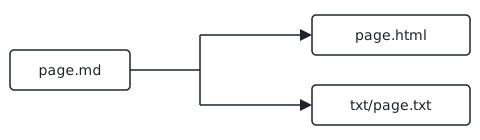
Rendered

- The path is relative to the page's folder, unlike a link: put the image next to the page. This page is
content/docs/reference/markdown/links-and-images.md, and its image iscontent/docs/reference/markdown/flow.svg. For a post, make the post a folder,blog/2026-01-01-hello/index.md, with the image inside. - The alternative text is required: it is what a screen reader says and what the text mirror shows.
- The caption may hold inline markup. The path may not hold a space.
- An image from another site,
https://example.org/map.png, is allowed by the syntax, but the recommended server policy only lets pages load images from their own site: it will not display (deployment).
On the web page, the image is a <figure>: the image at its natural size, never wider than the column, its width and height read from the file (PNG, JPEG, GIF, WebP or SVG) so the page does not jump while it loads, lazy loading, and the caption in a <figcaption>. In the text mirror, the alternative text follows the labels.image word, then the caption and the image's path from the site root, for curl. The figure above, in this page's mirror:
[ image ] One Markdown file, two outputs: HTML and text
  One source, two renderings.
  /docs/reference/markdown/flow.svg
The build warns, and goes on, when the file is missing or the alternative text is empty:
warning: image not found: content/blog/2026-01-01-hello/flow.svg
warning: image without alt text: blog/2026-01-01-hello/flow.svg
Prefer SVG for diagrams: line art stays sharp at any size, and an SVG file may carry its own dark-mode colours, in a @media (prefers-color-scheme: dark) block. The recommended server policy lets an SVG file style itself, never run a script. The images of link previews are a separate matter, set in the front matter (feeds and images).